HubSpot vs. Webflow: The Ultimate Comparison Guide 2026
A clear, honest breakdown to help you choose the right platform for your website and marketing strategy
Introductio of HubSpot vs. Webflow
When you see HubSpot vs. Webflow in the same search query, it usually means you’re at a critical decision point: you need a website that converts visitors into customers, but you’re unsure which platform will actually get you there.
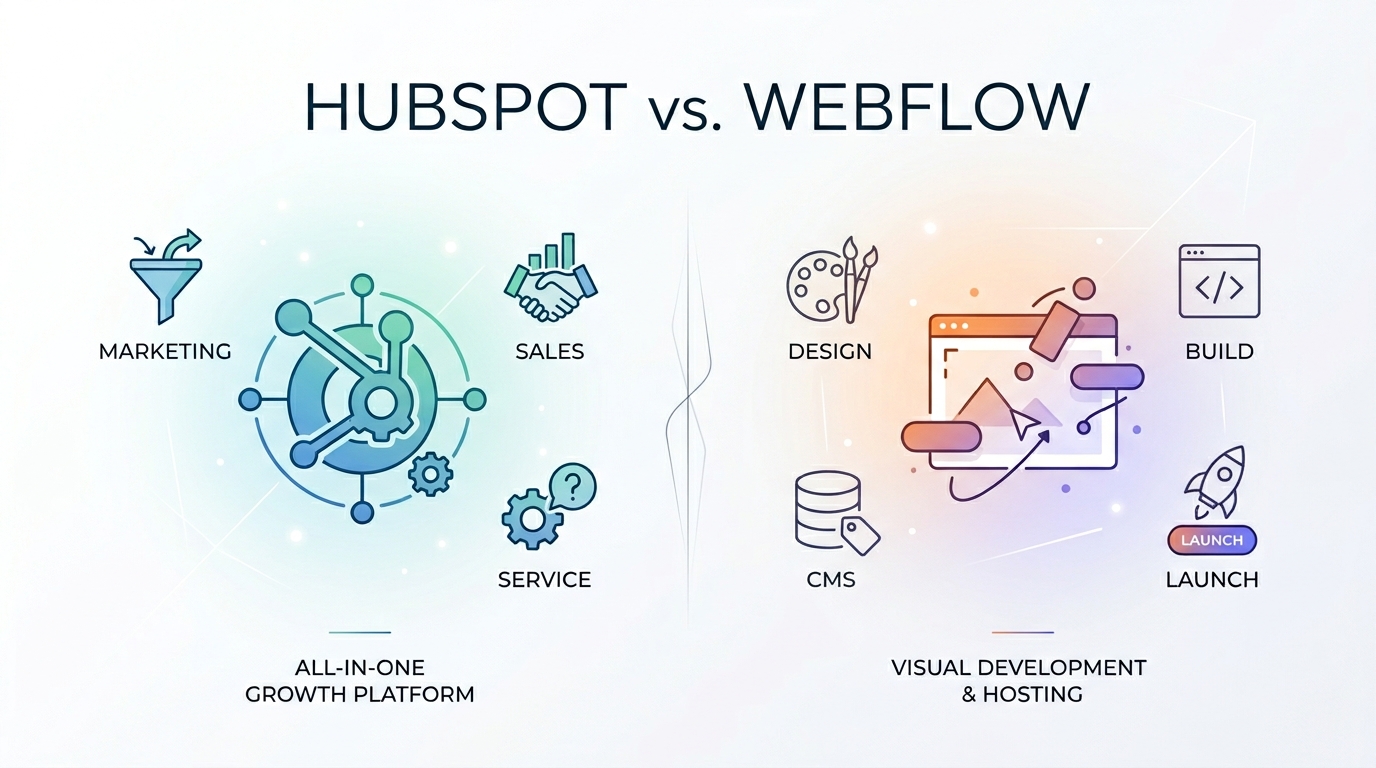
Here’s the honest truth upfront: these two platforms are not direct competitors. Comparing them is like choosing between a Swiss Army knife and a master carpenter’s chisel. They overlap in one area — website building — but their core purposes, strengths, and ideal users are fundamentally different.
- HubSpot is a CRM and marketing automation platform that includes a website builder.
- Webflow is a visual web design and CMS platform that can connect to marketing tools.
In 2026, both have evolved significantly. HubSpot has embedded AI across its marketing and sales workflows. Webflow has matured its CMS, logic builder, and developer experience. But their philosophical differences remain unchanged.
This guide cuts through the noise. We’ll compare them across design, marketing, pricing, SEO, scalability, and more — so you can make a decision aligned with your actual goals, not feature checklists.
Quick Overview: What Are We Actually Comparing?
What Is HubSpot?
HubSpot is an all-in-one CRM, marketing, sales, and service platform used by over 194,000 companies worldwide. Its website builder is a module within the broader ecosystem, designed specifically for inbound marketing, lead capture, and conversion optimization.
Reference: HubSpot Official Site
What Is Webflow?
Webflow is a visual web design tool, CMS, and hosting platform that generates clean, production-ready code without manual programming. It’s built for designers, developers, and brands who demand pixel-perfect creative control.
Reference: Webflow Official Site
At a Glance: HubSpot vs. Webflow Comparison Table
| Feature | HubSpot | Webflow |
|---|---|---|
| Primary Focus | CRM & Marketing Automation | Visual Design & CMS |
| Website Builder | Template-driven, marketing-focused | Pixel-perfect, design-first |
| Built-in CRM | Yes (industry-leading) | No |
| Email Marketing | Yes (native, advanced) | No (requires integration) |
| Ease of Use | Intuitive for marketers | Moderate to steep learning curve |
| Design Flexibility | Limited (template constraints) | Unlimited (CSS-level control) |
| Starting Price | Free (limited site builder) | Free (very limited) |
| SEO Tools | Guided, marketing-optimized | Technical, developer-friendly |
| Performance | Good (can be script-heavy) | Excellent (clean code, fast CDN) |
| Best For | Marketing teams, sales-driven sites | Designers, agencies, brand sites |
Round 1: Website Building & Design
HubSpot Website Builder
HubSpot’s builder is reliable, fast to deploy, and deeply integrated with its marketing tools. It uses a drag-and-drop interface with pre-built modules for forms, CTAs, blogs, and landing pages.
Strengths:
- ✅ Lightning-fast setup for marketing sites
- ✅ Built-in landing page and template library
- ✅ Seamless connection to CRM, email, and analytics
- ✅ A/B testing and conversion tracking native to the editor
Limitations:
- ❌ Design constrained to templates and modules
- ❌ Limited custom layout control
- ❌ Animations and advanced interactions require custom code
- ❌ Can feel “corporate” or generic without heavy customization
Webflow Designer
Webflow replaces traditional coding with a visual interface that maps directly to HTML, CSS, and JavaScript. You control every margin, breakpoint, hover state, and animation.
Strengths:
- ✅ Complete creative freedom with zero template restrictions
- ✅ Advanced animations, scroll effects, and micro-interactions
- ✅ Fully responsive with custom breakpoints
- ✅ Global style systems and component-based design
Limitations:
- ❌ Steeper learning curve for non-designers
- ❌ Slower initial build time for complex sites
- ❌ No built-in marketing modules (forms, CTAs require setup)
🏆 Winner: Webflow (Design) | HubSpot (Speed & Marketing Alignment)
Round 2: Marketing & CRM Capabilities
HubSpot
This is HubSpot’s home territory. The platform was built to attract, engage, and delight customers through unified workflows.
What’s included:
- Native CRM with contact and deal tracking
- Email marketing with segmentation and automation
- Lead scoring and nurture workflows
- Sales pipeline management
- Service desk and ticketing
- Content strategy and blog management
- Built-in conversation analytics
HubSpot turns your website into a lead generation engine where every form, CTA, and page view feeds directly into actionable marketing and sales data.
Webflow
Webflow has no native CRM, email marketing, or automation features. It’s a presentation and content platform. To handle marketing, you integrate third-party tools:
- CRM: HubSpot, Salesforce, Pipedrive
- Email: ConvertKit, Mailchimp, ActiveCampaign
- Automation: Zapier, Make
- Analytics: GA4, Hotjar, Mixpanel
The flexibility is powerful, but it means managing multiple subscriptions, connections, and data syncs.
🏆 Winner: HubSpot
Marketing and CRM functionality isn’t just better on HubSpot — it’s native, unified, and industry-leading.
Round 3: Ease of Use & Learning Curve
HubSpot
If you’ve ever used a website builder or drag-and-drop tool, HubSpot will feel familiar. The interface is guided, with clear modules, pre-built templates, and inline recommendations.
Marketing teams can launch a professional site in days. The CRM and automation tools have a learning curve, but HubSpot’s Academy (free courses) and documentation are among the best in SaaS.
Learning Curve: ⭐⭐ (Low to moderate)
Webflow
Webflow requires understanding web design fundamentals. You’re working with concepts like:
- Box model, padding, and margins
- Flexbox and CSS Grid
- Responsive breakpoints and fluid typography
- Interactions, timelines, and states
Webflow University is excellent, but realistically, expect 3–6 weeks to feel comfortable building production-ready sites. Once you cross that threshold, efficiency skyrockets.
Learning Curve: ⭐⭐⭐⭐ (Steep but highly rewarding)
🏆 Winner: HubSpot
For non-designers and marketing teams, HubSpot is dramatically easier to adopt.
Round 4: Pricing & Value
HubSpot Pricing (2026)
HubSpot uses a freemium model with tiered plans:
| Plan | Monthly Price | Website Builder Access |
|---|---|---|
| Free | $0 | Very limited (basic pages) |
| Starter | ~$20/month | Basic site builder, CRM, email |
| Professional | ~$800/month | Advanced builder, automation, reporting |
| Enterprise | Custom ($3k–$10k+/mo) | Full suite, white-glove support |
Note: Pricing varies by region and annual billing. CRM is free; advanced marketing features scale quickly.
Webflow Pricing (2026)
Webflow uses straightforward subscription tiers:
| Plan | Monthly Price | Key Features |
|---|---|---|
| Starter | Free | 2 pages, .webflow domain |
| Basic | $14/month | 150 pages, custom domain |
| CMS | $23/month | 2,000 CMS items, 3 editors |
| Business | $39/month | 10,000 CMS items, analytics |
| Enterprise | Custom | Unlimited, SSO, advanced security |
Additional costs: Email platform ($15–$100/mo), CRM ($0–$500+/mo), integrations.
🏆 Winner: Depends on Your Stack
HubSpot wins if you need an all-in-one marketing platform. Webflow wins if you want predictable, transparent website pricing without bloat.
Round 5: SEO & Performance
HubSpot SEO & Performance
HubSpot offers guided SEO tools:
- ✅ Meta tag management
- ✅ Automatic sitemap and canonical tags
- ✅ Built-in SEO recommendations per page
- ✅ Schema markup for blogs and FAQs
- ✅ Fast page speeds (but can be impacted by marketing scripts)
Performance is generally solid, but heavy automation, tracking pixels, and form scripts can increase page weight if not optimized.
Webflow SEO & Performance
Webflow excels at technical SEO and speed:
- ✅ Clean, minimal HTML/CSS/JS output
- ✅ Automatic image optimization and WebP delivery
- ✅ Global CDN included
- ✅ Full control over heading structure, alt text, and schema
- ✅ Consistently scores 90+ on Core Web Vitals out of the box
Webflow sites load faster by default and give developers complete control over technical SEO.
🏆 Winner: Webflow
Superior performance and cleaner code give Webflow an edge for search and user experience.
Round 6: Integrations & Ecosystem
HubSpot
HubSpot’s marketplace features 2,000+ integrations across CRM, HR, e-commerce, analytics, and communication tools. The platform is designed to connect everything.
Deep native integrations include:
- Salesforce, Slack, Microsoft 365
- Shopify, WooCommerce, Stripe
- Google Analytics, LinkedIn, Meta Ads
- Zapier, Make, custom APIs
Webflow
Webflow’s integration ecosystem is smaller (~100+ native connections) and relies heavily on Zapier/Make for advanced workflows. Focus is on design, hosting, and CMS — not marketing infrastructure.
🏆 Winner: HubSpot
Unmatched ecosystem depth and native connectivity.
Round 7: Scalability & Enterprise Use
HubSpot
Built for growth. Handles:
- Millions of contacts and deals
- Multi-department workflows (marketing, sales, service)
- Global compliance (GDPR, CCPA)
- Custom permissions and SSO
- Dedicated enterprise support and implementation partners
Webflow
Scales well for content and traffic, but lacks enterprise marketing/CRM infrastructure. Large organizations using Webflow typically stack it with HubSpot, Salesforce, or Segment for data and automation.
🏆 Winner: HubSpot
Enterprise-grade scalability and compliance are native to HubSpot.
Round 8: Analytics & Reporting
HubSpot
Unified dashboards across marketing, sales, and service. Features include:
- Multi-touch attribution
- Custom report builder
- Funnel analysis
- Campaign ROI tracking
- Predictive lead scoring (AI)
Webflow
Basic built-in analytics on Business+ plans. Deep reporting requires GA4, Mixpanel, or third-party dashboards. Great for traffic metrics, weak for revenue attribution.
🏆 Winner: HubSpot
End-to-end analytics that connect website activity to pipeline revenue.
Final Scorecard
| Category | HubSpot | Webflow |
|---|---|---|
| Website Design | — | 🏆 Winner |
| Marketing & CRM | 🏆 Winner | — |
| Ease of Use | 🏆 Winner | — |
| Pricing Value | 🤝 Tie | 🤝 Tie |
| SEO & Performance | — | 🏆 Winner |
| Integrations | 🏆 Winner | — |
| Scalability | 🏆 Winner | — |
| Analytics | 🏆 Winner | — |
| Total | 6 Wins | 2 Wins |
It’s Not a Fair Fight — And That’s Okay
The scorecard looks lopsided, but that’s because you’re comparing a marketing operating system to a design platform. HubSpot wins on everything related to leads, automation, and data. Webflow wins on everything related to visual control and front-end performance.
The real question isn’t “which is better?” It’s “what are you actually trying to build?”
Who Should Choose HubSpot?
✅ Inbound Marketing Teams
If your website exists to generate leads, nurture prospects, and feed a sales pipeline, HubSpot is purpose-built for you.
✅ Sales-Driven Businesses
Companies that need CRM tracking, deal management, email sequences, and campaign attribution will thrive on HubSpot.
✅ Teams Prioritizing Speed Over Custom Design
If you need a professional, conversion-optimized site live in days — not weeks — HubSpot’s templates and modules deliver.
✅ Organizations Using a Unified Tech Stack
If you want marketing, sales, service, and analytics in one platform with native data flow, HubSpot eliminates integration headaches.
✅ Budget-Conscious Startups (Initially)
The free CRM and starter marketing tools let you validate ideas before scaling to paid plans.
Who Should Choose Webflow?
✅ Design Agencies & Freelancers
If your competitive advantage is visual execution, Webflow gives you the canvas to build award-winning sites without developer bottlenecks.
✅ Brand-Focused Companies
When design language, typography, and micro-interactions are central to your identity, Webflow’s control is non-negotiable.
✅ Teams Using External Marketing Stacks
If you already use ConvertKit, Pipedrive, GA4, and Zapier, Webflow slots cleanly into your existing workflow.
✅ Performance-First Publishers
Blogs, portfolios, and content sites that prioritize speed, Core Web Vitals, and clean code will outperform on Webflow.
✅ Businesses Planning a Hybrid Stack
Many companies use Webflow for the front-end and HubSpot for marketing/CRM. If you’re comfortable managing two tools, this combination is powerful.
The Hybrid Approach: Webflow + HubSpot
This is the industry standard for mid-market companies in 2026:
Webflow handles:
- Custom homepage and product pages
- Portfolio and case studies
- SEO-optimized blog architecture
- Brand-consistent design system
HubSpot handles:
- CRM, lead capture forms, and CTAs
- Email marketing and automation
- Analytics, attribution, and reporting
- Sales pipeline and customer service
How they connect:
- HubSpot forms embedded into Webflow pages
- Webflow CMS content mapped to HubSpot campaigns
- Tracking pixels and GA4 unified in HubSpot
- Zapier/Make handling custom data syncs
This stack gives you Webflow’s design excellence + HubSpot’s marketing intelligence — the best of both worlds.
Key Questions to Ask Before You Decide
- What is your primary goal?
Lead generation & sales → HubSpot | Visual brand & custom design → Webflow - Who will maintain the site?
Marketing team → HubSpot | Designer/developer → Webflow - Do you need a CRM or email marketing?
Yes → HubSpot (native) | Webflow (requires integration) - How important is pixel-perfect design?
Critical → Webflow | Functional & conversion-focused → HubSpot - What’s your budget & timeline?
Fast launch, integrated tools → HubSpot | Higher upfront time, predictable cost → Webflow - Are you comfortable managing multiple tools?
No → HubSpot | Yes → Webflow + marketing stack
Looking Ahead to 2026: Platform Trajectories
HubSpot’s Direction
- AI deeply embedded in content creation, email personalization, and predictive lead scoring
- Expanded commerce tools to compete with Shopify CRM features
- Simplified pricing tiers for SMBs amid economic pressure
- Stronger developer APIs for custom extensions and headless setups
Webflow’s Direction
- AI design assistants for layout generation, content population, and responsive adjustments
- Enhanced Logic & Automation to reduce reliance on Zapier/Make
- Improved CMS workflows for multi-author editorial teams
- Better native forms & integrations to close the marketing gap
Both platforms are investing heavily in AI, but they’re applying it to different problems: HubSpot optimizes conversion and data; Webflow optimizes design speed and developer experience.
Conclusion: Making the Right Call
After breaking down design, marketing, pricing, SEO, and scalability, here’s how to decide:
Choose HubSpot if: Your website is a lead generation engine, you need CRM + email + automation, and your team prioritizes marketing results over custom design.
Choose Webflow if: Your website is a brand experience, you demand pixel-perfect control, and you’re comfortable connecting external marketing tools.
Choose both if: You want award-winning design + enterprise-grade marketing. The Webflow + HubSpot hybrid is the gold standard for growth-focused companies in 2026.
Stop over-indexing on feature lists. Define your primary goal, audit your team’s skills, and pick the platform that removes friction from your actual workflow.
Build intentionally. Optimize relentlessly. The platform matters less than the strategy behind it.
Essential Resources
| Resource | Purpose |
|---|---|
| HubSpot Website Builder Docs | Official builder documentation |
| Webflow University | Free design & CMS training |
| HubSpot Academy | Free marketing & CRM courses |
| Webflow + HubSpot Integration Guide | Official setup walkthrough |
| Google Web Vitals | Performance & SEO metrics |
Found this comparison useful? Share it with your marketing or design team. Questions about integrating Webflow and HubSpot? Drop them below — we respond to every comment.
Category: Platform Comparisons | Marketing Technology | Web Design | Business Tools